Authentication mechanism
In order to connect to the Messaging API, an external client needs an MQTT token. The process to obtain such a token consists of two steps:
- Acquire a REST token with the correct permissions and restrictions, using the API key.
- Acquire the MQTT token with the correct permissions and restrictions. The authentication method for this call is passing the REST token as a Bearer token in the HTTP Authorization header.
This two-step acquisition process gives the API client the possibility to set up its own authentication mechanism for external clients.
Tip
Don’t let MQTT/HTTP clients authenticate directly with the DSH. In that case, you need to encode the API key in every client, which is not secure. See Guidelines for more information.
Setup
The diagram below displays the constituents that are typically present when you set up a connection between an external MQTT/HTTP client, and the DSH:
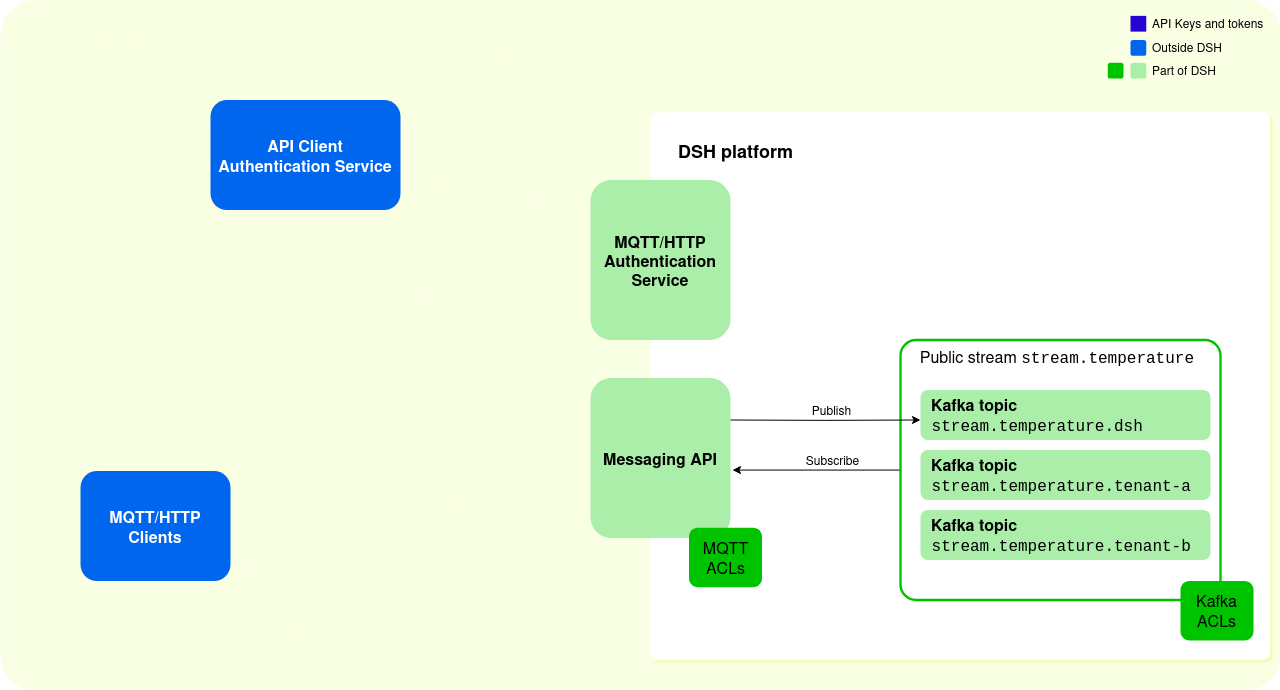
In this example, the DSH contains the following:
- A public DSH stream with Kafka topics:
- A DSH stream is a collection of Kafka topics.
- A Kafka client can write directly to the topics available to its tenant, for example to the Kafka topic ‘stream.temperature.tenant-a’.
- MQTT/HTTP clients must publish via the Messaging API, and their messages are written to the Kafka topic with the
.dshsuffix, for example to the Kafka topic ‘stream.temperature.dsh’. MQTT/HTTP clients can consume from all Kafka topics in the DSH stream, if the Access Control Lists allow it.
- A set of MQTT Access Control Lists (ACLs) for the DSH stream: they describe which MQTT topics that external clients can publish or subscribe to.
- A set of Kafka ACLs: they describe which Kafka topics that DSH tenants can read or write to.
- The MQTT/HTTP Authentication Service: it handles all requests for REST tokens and MQTT tokens, which are necessary to access the Messaging API.
- The Messaging API: it handles all data requests from clients that connect using the MQTT protocol or HTTP protocol, and the clients needs an MQTT token to access it.
If you set up external clients that want to connect to the DSH via MQTT or HTTP, then you need the following:
- An API Client Authentication Service: it acts as an intermediary between the MQTT/HTTP clients and the DSH, and it handles the authentication of the MQTT/HTTP clients.
- MQTT/HTTP clients: devices or applications that connect to the DSH via the MQTT/HTTP protocol.
Tip
The choice between MQTT or HTTP as a protocol depends on your use case. See MQTT and HTTP for more information.
Given this setup, you have two ways to implement the authentication process, depending on how the API Client Authentication Service acts as an intermediary: full mediation and partial mediation.
Full mediation
The diagram below displays the authentication sequence where the API Client Authentication Service handles all requests between the MQTT/HTTP clients and the DSH:
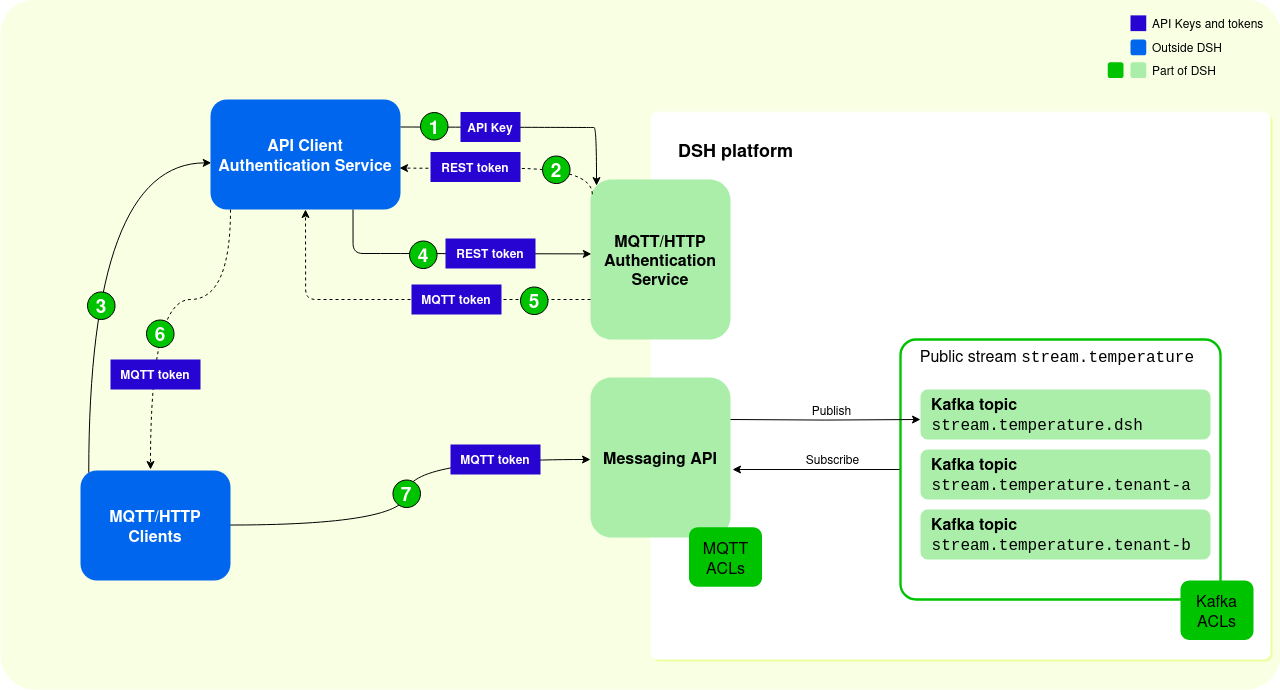
The sequence contains the following steps:
- The API Client Authentication Service uses its API key to request a REST token from the DSH’s MQTT/HTTP Authentication Service:
- The API Client Authentication Service can request a limited list of authorizations, which results in a REST token with limited claims. These limit the operations and the resources that external clients have access to.
- If the API Client Authentication Service doesn’t request such a set of permissions, then the MQTT/HTTP Authentication Service returns a REST token that grants permissions as defined in the MQTT ACLs and Kafka ACLs.
- The DSH’s MQTT/HTTP Authentication Service sends a REST token to the API Client Authentication Service:
- The REST token is long-lived. The maximum expiration time of the REST token is 30 days, which is also the default value.
- The REST token contains a list of claims, depending on the list of authorizations that was requested. These claims define which operations and resources external MQTT/HTTP clients can access.
- An MQTT or HTTP client uses its credentials to authenticate with the API Client Authentication Service, and it requests an MQTT token.
- The API Client Authentication Service uses its REST token to request an MQTT token from DSH’s MQTT/HTTP Authentication Service. The API Client Authentication Service can request an MQTT token that contains only a subset of the claims in the REST token. This allows for MQTT tokens with fine-grained claims.
- The DSH’s MQTT/HTTP Authentication Service sends an MQTT token to the API Client Authentication Service:
- The MQTT token is short-lived. The maximum expiration time of the MQTT token is 7 days. Ideally, the expiration time is much shorter.
- The MQTT token contains a list of claims, which define the operations and resources that the specific external MQTT/HTTP client can access. Ideally, these claims are very specific and tailored to needs of the external MQTT/HTTP client.
- The API Client Authentication Service sends the MQTT token to the MQTT/HTTP client.
- The MQTT/HTTP client uses the MQTT token to connect to the Messaging API. The DSH uses the claims in the token to limit MQTT/HTTP clients’ permissions.
The sequence diagram below shows the different steps for authentication with full mediation:
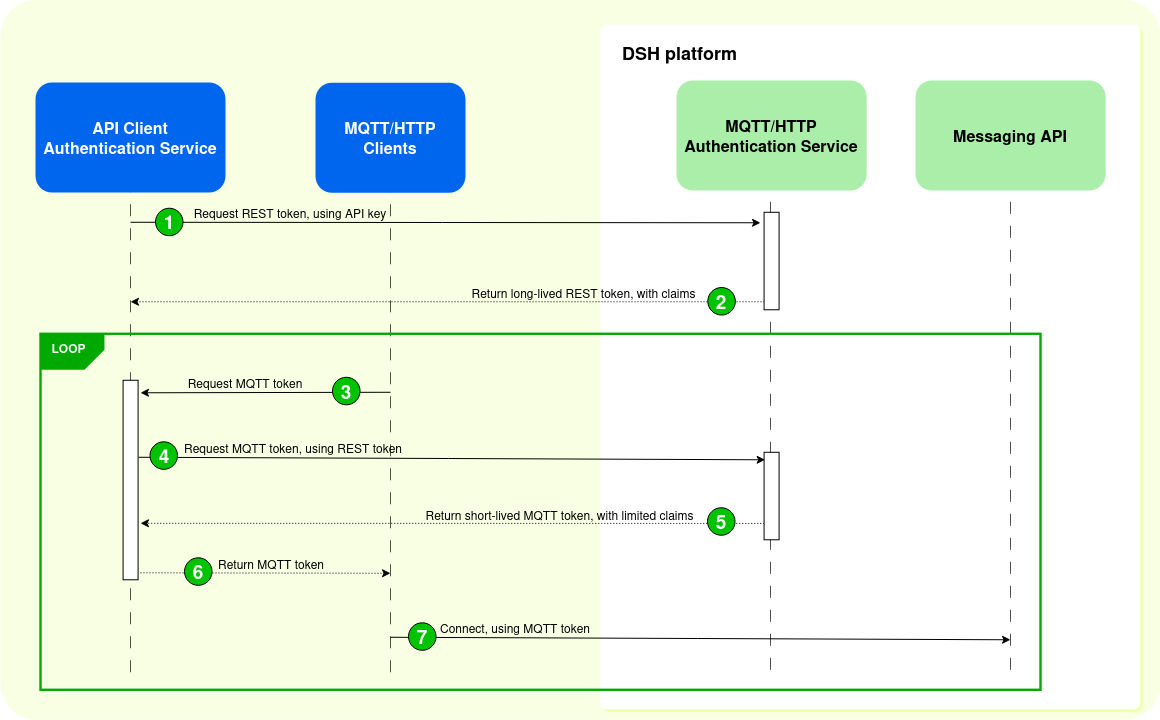
The sequence with full mediation has a few advantages:
- The API Client Authentication Service can issue MQTT tokens with fine-grained claims. That way, the MQTT/HTTP clients have only limited access to the MQTT topics in the DSH stream.
- Because MQTT tokens are short-lived, the API Client Authentication Service can adapt the claims in the MQTT tokens as necessary.
- An MQTT/HTTP client can’t request an MQTT token with more claims without passing through the API Client Authentication Service.
The sequence with full mediation has a few disadvantages:
- The API Client Authentication Service receives a somewhat higher load, because all MQTT/HTTP clients have to pass through it.
- The MQTT/HTPP client experiences a higher connection setup latency, because it needs to pass through the API Client Authentication Service before it can connect to the DSH.
Partial mediation
The diagram below displays the authentication sequence where MQTT/HTTP clients request their MQTT tokes directly from the DSH:
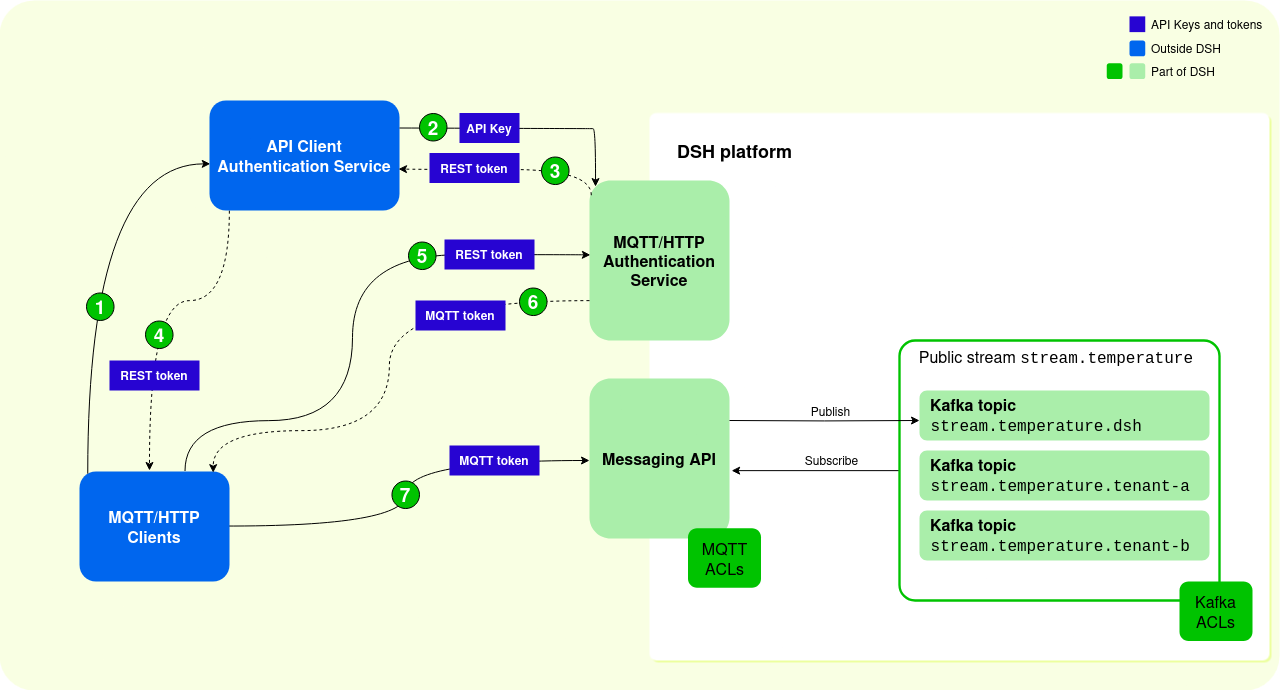
- An MQTT or HTTP client uses its credentials to authenticate to the API Client Authentication Service, and it requests a REST token.
- The API Client Authentication Service uses its API key to request a REST token from the DSH’s MQTT/HTTP Authentication Service:
- The API Client Authentication Service can request a limited list of authorizations, which results in a REST token with limited claims. These limit the operations and the resources that external clients have access to.
- If the API Client Authentication Service doesn’t request such a set of permissions, then the MQTT/HTTP Authentication Service returns a REST token that grants permissions as defined in the MQTT ACLs and Kafka ACLs.
- The DSH’s MQTT/HTTP Authentication Service sends a REST token to the API Client Authentication Service:
- The REST token is long-lived. The maximum expiration time of the REST token is 30 days, which is also the default value.
- The REST token contains a list of claims, depending on the list of authorizations that was requested. These claims define which operations and resources external MQTT/HTTP clients can access.
- The API Client Authentication Service sends the REST token to the MQTT/HTTP client.
- The MQTT/HTTP client uses its REST token to request an MQTT token from DSH’s MQTT/HTTP Authentication Service. The MQTT/HTTP client can request an MQTT token that contains only a subset of the claims in the REST token.
- The DSH’s MQTT/HTTP Authentication Service sends an MQTT token to the MQTT/HTTP client:
- The MQTT token is short-lived. The maximum expiration time of the MQTT token is 7 days. Ideally, the expiration time is much shorter.
- The MQTT token contains a list of claims, which define the operations and resources that the specific external MQTT/HTTP client can access. Ideally, these claims are very specific and tailored to needs of the external MQTT/HTTP client.
- The MQTT/HTTP client uses the MQTT token to connect to the Messaging API. The DSH uses the claims in the token to limit MQTT/HTTP clients’ permissions.
The sequence diagram below shows the different steps for authentication with partial mediation:
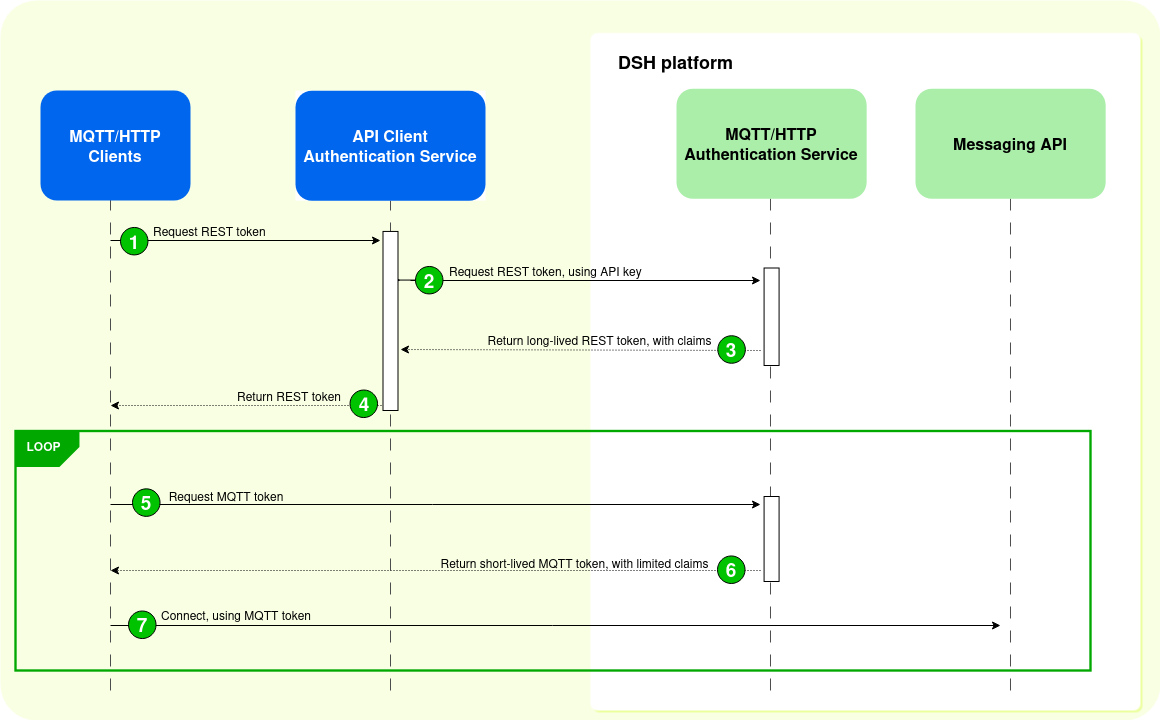
The sequence with partial mediation has a few advantages:
- The load on the API Client Authentication Service is low, because it requests and delivers REST tokens only.
- As a consequence, there is a decreased connection setup latency because once the external MQTT/HTTP client has its REST token, it connects directly to the DSH platform to acquire an MQTT token.
The sequence with partial mediation has a few disadvantages:
- Individual MQTT/HTTP clients can request access to all MQTT topics mentioned in the claims of the REST token. This means that you have to be very careful with the claims that are included in the REST token.
- It’s harder to update the permissions of individual MQTT/HTTP clients, because they receive a REST token, which is long-lived.
Guidelines
Consider the following guidelines when you set up external MQTT/HTTP clients:
- This should be obvious, but keep your API key secret and don’t pass it on to MQTT/HTTP clients:
- Treat the API key as a password.
- External MQTT/HTTP clients can use the API key to request all the permissions mentioned in the MQTT ACLs, which may amount to full access.
- Sharing the API key will make it more prone to leaks.
- It’s easier to update the API key in one (authentication) service than to change it for a multitude of clients.
- Make your MQTT tokens short-lived: 5 minutes or even shorter.
- Limit the permissions in tokens to an absolute minimum:
- Give MQTT/HTTP clients only the access they need.
- If a token with limited permissions is compromised, then the fallout is also limited. Even more so if the token only has a limited lifespan.