Overview
Via the Messaging API, external clients can publish and subscribe to public DSH streams:
- Messages published to a public DSH stream via the Messaging API are written to the
*.dshKafka topic of that stream. - Via the MQTT protocol, external clients can publish and subscribe to MQTT topics, and they can receive new messages as they appear on an MQTT topic.
- Via the HTTP protocol, external clients can publish to MQTT topics, but they can only receive the retained messages for an MQTT topic.
- If an external client subscribes to a public DSH stream, then it subscribes to all Kafka topics in the DSH stream. This includes the Kafka topics in the DSH stream that are owned by tenants.
- As a tenant, you can request a platform administrator to limit the MQTT topics that external clients can access via the APIs. This is managed via “Publish” and “Subscribe” permissions and MQTT wildcards in Access Control Lists (ACLs).
- All connections are encrypted using TLS.
The DSH combines the MQTT protocol with Apache Kafka: if you write a message to a public DSH stream via the Messaging API, then the DSH stores this message in a Kafka topic. As a consequence, you encounter concepts from both MQTT and Kafka on the DSH, and the DSH also introduces new concepts to interact with MQTT and Kafka. The following sections describe all these concepts.
MQTT and HTTP
The DSH offers a Messaging API for both MQTT and HTTP, but they serve different use cases.
- MQTT:
- Use MQTT for persistent connections between external clients (MQTT clients) and the DSH.
- The MQTT client receives a new message as soon as it’s published on the DSH.
- This supports the scenario of devices that have a permanent connection to the DSH and that want to produce to or consume from MQTT topics on the DSH non-stop via a data stream.
- HTTP:
- Use HTTP for short-lived connections between external clients (HTTP clients) and the DSH.
- The HTTP client can only receive retained messages from the DSH.
- This supports the scenario of devices that are in sleeping mode most of the time, wake up at a set time interval, make a connection, exchange data with the DSH, and go back to sleep again.
Tip
- Use the Messaging API if your use case involves small amounts of data and a large number of producers and consumers.
- Use the Kafka Proxy if your use case involves large amounts of data and a small number of producers and consumers.
MQTT specification
The DSH implements MQTT as follows:
- It implements a subset of the MQTT 3.1.1 protocol.
- Each standards-compliant MQTT client can connect to the DSH without problems.
- The DSH doesn’t support the following features:
- QoS 2
- QoS 1 for subscriptions. The DSH downgrades all subscriptions automatically to QoS 0.
- Last-will-and-testament
- Session resumption. The DSH treats each connection as if the
clean-sessionflag was set.
- The DSH extends the MQTT protocol with Wildcard publications.
- All external clients have a maximum ingest rate (publish rate) of 10 messages per second. It isn’t possible to set a rate per client or per MQTT token.
- It’s recommended to use the client ID from the MQTT token provided by the DSH as the value for the MQTT client ID when you set up the connection with the Messaging API. See Client ID for more information.
HTTP specification
The current version of the REST API of the HTTP protocol adapter is version 0:
- The URLs have the following structure:
https://api.<platform-url>/data/v0/<single|multi>/<mqtt topic> - For example:
https://api.<platform-url>/data/v0/single/tt/temperature/house/kitchen/sensor
See HTTP specification for an overview of the endpoints.
MQTT topic and Kafka topic
The concept of “topic” exists in both MQTT and Kafka, which may lead to confusion.
If a client publishes messages to the DSH, then it needs to specify an MQTT topic:
- The MQTT topic is a path that represents a hierarchical structure. For example, ‘house/kitchen/sensor’ and ‘house/bathroom/sensor’ represent sensors in different rooms of the same house.
- As a consequence, messages with the same MQTT topic pertain to the same device or point of information.
- The MQTT topic must include the cluster (“/tt”) and the name of the public DSH stream. For a DSH stream called ‘temperature’, this results in the MQTT topics ‘/tt/temperature/house/kitchen/sensor’ and ‘/tt/temperature/house/bathroom/sensor’.
- The producer must include the MQTT topic if it writes a message to the DSH stream. This requirement applies to both external clients that connect via the Messaging API, and applications or services on the DSH that write to the DSH stream directly via Kafka.
- The DSH has expanded the MQTT protocol to allow wildcard publications:
- Applications or services on the DSH can publish a message ‘X’ that has an MQTT wildcard in its MQTT topic, e.g. ‘/tt/temperature/house/#’.
- The DSH transforms the MQTT topic path of the message to ‘/tt/temperature/house/’.
- If an external client subscribes to an MQTT topic that includes the prefix ‘/tt/temperature/house/’, then it will also receive message ‘X’. This means that clients that subscribe to the MQTT topics ‘/tt/temperature/house/kitchen/sensor’ and ‘/tt/temperature/house/bathroom/sensor’ also receive message ‘X’.
- See Wildcard publications for more information.
Tip
On the DSH, MQTT topic paths always have a leading forward slash (/):
-
/tt/temperature/house/kitchen/sensor -
tt/temperature/house/kitchen/sensor
The DSH writes the message to a Kafka topic in the public DSH stream:
- The DSH uses the MQTT topic as the message key to make sure that messages with an identical MQTT topic are written to the same partition of a Kafka topic, maintaining the order of the messages.
- If the message originates from an external client and comes into the DSH via the Messaging API, then the DSH writes the message to the
*.dshKafka topic of the public stream, for example ‘stream.temperature.dsh’. - If the message originates from a tenant’s application or service on the DSH, then the DSH writes the message to the Kafka topic of that tenant in the public DSH stream, for example ‘stream.temperature.tenant-a’ or ‘stream.temperature.tenant-b’.
- If a client subcribes to an MQTT topic, then it subcribes to all messages with that MQTT topic across all Kafka topics in the public DSH stream.
Retained messages
MQTT allows producers to mark messages as retained for a specific MQTT topic. If a client subscribes to the MQTT topic in question, it immediately receives the retained message. That way, the client receives data when it subscribes, and it doesn’t have to wait for an update of the data stream. However, Kafka doesn’t have this concept of retained messages. In order to resolve this conflict, the DSH introduces the Latest Value Store, which stores retained messages.
Publication
If a client publishes a retained message, then the DSH stores it in the Latest Value Store:
- Via MQTT: The external client can send a standard retained MQTT message. The DSH then writes this message to the
*.dshtopic of the public DSH stream in question, and it also adds this message to the Latest Value Store for the MQTT topic included in the message. - Via HTTP: The external client can publish a message through the POST method, and add the
?retained=truequery parameter. The DSH then writes this message to the*.dshtopic of the public DSH stream in question, and it also adds this message to the Latest Value Store for the MQTT topic included in the message. - Via Kafka on the DSH: A tenant’s application or service needs to set the
header.retainedfield in the KeyEnvelope totrue. See Key envelope for more information.
Consumption
If a client consumes an MQTT topic with a retained message, then the DSH retrieves it from the Latest Value Store:
- Via MQTT: The external client first receives the message from the Latest Value Store, if there is any. It then receives the new incoming messages for the MQTT topic in question.
- Via HTTP: The external client only receives data from the Latest Value Store. It never receives any new incoming messages for that MQTT topic.
- Via Kafka on the DSH: A tenant’s application or service can retrieve the retained message from the Latest Value Store. Additionally, it can consume the full history of messages for that MQTT topic because it can interact with Kafka directly.
Clearing the Latest Value Store
You can clear the Latest Value Store for a specific MQTT topic:
- Via MQTT: The external client can send a null (zero-length) message. Check the documentation of your MQTT client to find out how you can send a null message, for example mosquitto_pub for Mosquitto.
- Via HTTP: The external client can use the DELETE method.
- Via Kafka on the DSH: A tenant’s application or service needs to publish a Kafka message with a correctly enveloped key, and a data envelope value that has an empty
kind. See Implementing message envelopes for more information.
Wildcard publications
The MQTT protocol supports the use of topic wildcards for consuming messages from MQTT topics, see Topic wildcards in the MQTT specification. The DSH extends the MQTT specification, and supports topic wildcards for producing messages to MQTT topics, too.
Description
Wildcard publications are proprietary to the DSH. A wildcard publication is the conceptual mirror image of a standard MQTT wildcard subscription:
- A wildcard subscription lets external clients subscribe to an entire MQTT topic tree by using a topic prefix. All messages published on MQTT topics that have this prefix will be sent to the external client.
- A wildcard publication lets a producer publish a single message with an MQTT topic prefix, which will match all subscription filters that have the same prefix.
Note
- External clients connected over MQTT or HTTP can’t execute wildcard publications.
- You must produce wildcard publication messages onto the DSH stream directly from services running on the platform.
- However, external clients consuming data streams over MQTT/HTTP must know about wildcard publications, because it has an effect on how the DSH sends messages to subscribers.
Rationale
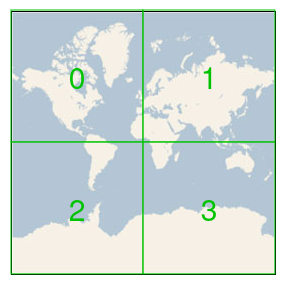
The concept of wildcard publications is inspired by geographical positions system like the Bing Maps Tile System. This system divides a map into tiles at different levels of detail, and uses the quadkey coordinate system to refer to these tiles. At the highest level, the map consists of 4 tiles, which each receive a coordinate:
You can then divide each of these 4 tiles into 4 more tiles:
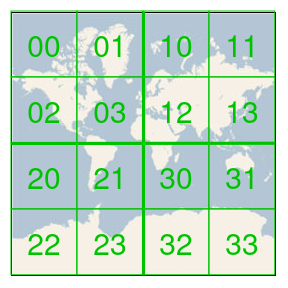
For each of these tiles, you can repeat this process, leading to smaller tiles and higher levels of detail. For example:
1/0/represents Northern Europe.1/0/2/2/3/1/2/1/represents the Norse island of Senja inside Northern Europe.
Using this type of coordinates has several advantages:
- There is a parent-child relation between different levels.
1/0/is a prefix in1/0/2/2/3/1/2/1/, which expresses that Senja is part of Northern Europe. - The number of levels expresses the level of detail.
- Similarity between coordinates can express geographical proximity.
These systems are a prime candidate to use in a setup involving MQTT topics:
- Use
1/0/#to subscribe to all messages about Northern Europe. - Use
1/0/2/2/3/1/2/1/#to subscribe to all messages about Senja.
However the parent-child relationship of these coordinates also make it interesting to use wildcards when publishing messages. If a client uses a wildcard to produce a message to a specific level of an MQTT topic, then the message becomes available to clients that subscribe to a child of that level. For example:
- A client produces message ‘X’ to the MQTT topic
1/0/#, for Northern Europe. - Message ‘X’ also appears in the data stream of clients that subscribe to the MQTT topic
1/0/2/2/3/1/2/1/#, for Senja. - This makes sense, because the island of Senja is part of Northern Europe.
Examples
Consider a wildcard publication that results in the a/b/# message key.
The following subscription patterns match the message key, leading to a delivery of the message:
a/ba/b/#a/b/c/d/ea/b/c/d/#
The following subscription patterns won’t match the message key, and the message won’t be delivered:
a:a/bisn’t a prefix ofaa/#:a/bisn’t a prefix ofaa/c:a/bisn’t a prefix ofa/ca/bb:a/bisn’t a prefix ofa/bbbecause prefixes are matched against entire topic levels
Expanding wildcard publications
If a client produces a message using a wildcard publication, then the DSH stores the message, with the wildcard pattern as its message key. If a client subsequently consumes this message because its subscription pattern matches the message key, then the DSH expands the stored message key until there is a minimal match with the subscription pattern. Any wildcards need to be removed or replaced, because topic names can’t contain them. For example:
- Kafka client ‘X’ produces a message ‘message-1’ with the wildcard publication
a/b/#. - The DSH stores this message, and uses
a/b/#as its message key. - MQTT client ‘Y’ subscribes to the topic using the subscription pattern
a/b/c/d. - This pattern matches message key of ‘message-1’:
- The DSH can’t send
a/b/#as an MQTT topic name because it contains a wildcard. - Instead, the DSH expands the message key until there is a minimal match with the subscription pattern.
- The result is the MQTT topic name
a/b/c/d.
- The DSH can’t send
Note
As a consequence, MQTT client ‘Y’ can’t find out whether the message it receives was initially a regular publication, or a wildcard publication.
If the subscription pattern matches the stored message key, the DSH uses the following rules to expand the message key:
- Preserve the prefix that the message key and the subscription pattern have in common.
- Preserve non-wildcard topic levels in the subscription pattern, obeying the normal MQTT rules.
- Replace a
+wildcard in the subscription pattern with a zero-length topic level, because wildcards aren’t allowed in topic names. - Drop a terminating
#wildcard in the subscription pattern. - If the stored message key ends in
#/a-suffix:- Do nothing if the subscription pattern ends in
/a-suffix, because the rules above already apply. - Add
/a-suffixif the subscription pattern ends in the#wildcard.
- Do nothing if the subscription pattern ends in
The table below shows how the DSH expands stored message keys, given several subscription patterns:
| Stored message key | SUB(a/b/c/d) |
SUB(a/b/c/d/#) |
SUB(a/b/c/+/+/e) |
|---|---|---|---|
a/b/c/# |
a/b/c/d |
a/b/c/d |
a/b/c///e |
a/b/c/#/d |
a/b/c/d |
a/b/c/d/d |
No match |
a/b/c/#/e |
No match | a/b/c/d/e |
a/b/c///e |
a/b/c/d/# |
a/b/c/d |
a/b/c/d |
a/b/c/d//e |